


Benefits OnLine
3.51.06K Reviews
App Specs
- Version
- 26.08.02
- Updated On
- License
- Free
- Downloads
- 1,000,000+
- Developer
- Merrill Lynch, Pierce, Fenner, and Smith Inc.
- Categories
- Finance
- Platform
- Android
Screenshots
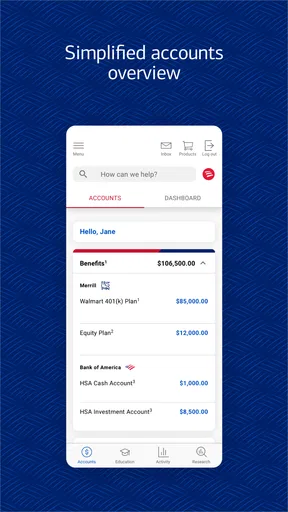
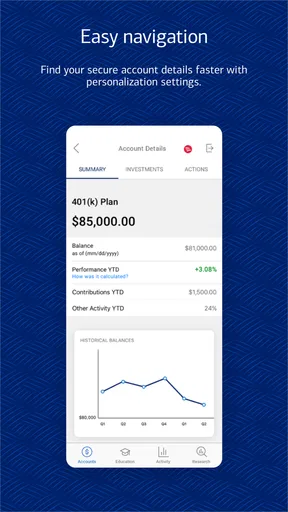
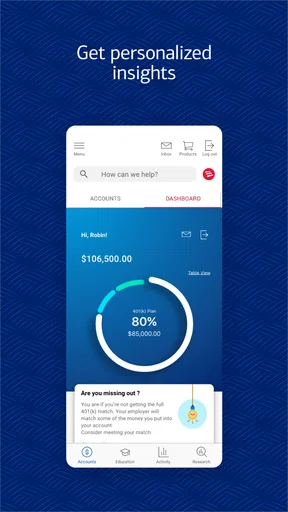
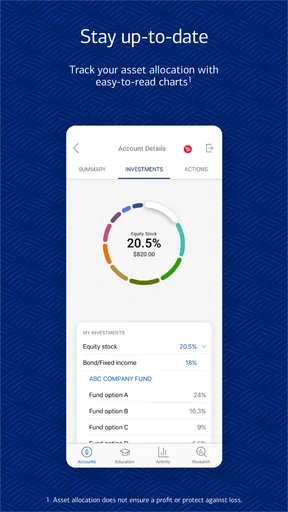
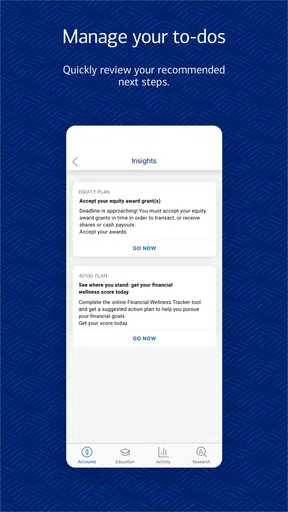
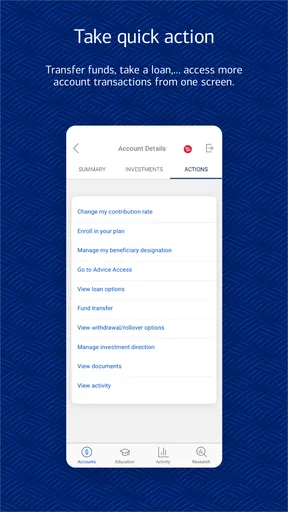
 Analysis by AppCompare
When retirement information is scattered across workplace paperwork, remembered passwords, and several browser tabs, Benefits OnLine is meant to give that process one mobile starting point. I reviewed it as a finance app rather than as a general budgeting tool, and that distinction matters: its focus is retirement and benefit services associated with Merrill Lynch, Pierce, Fenner, and Smith Inc., not everyday spending, bill tracking, or investment education for everyone.
Benefits OnLine is most useful when you already have a workplace-related relationship with the service. In that situation, the app can be a convenient way to check the information connected to your retirement and benefits arrangements while you are away from a computer. If you are looking for a personal finance dashboard that combines bank accounts, credit cards, subscriptions, and household budgets, I would look elsewhere. This is a more focused tool, and its value depends heavily on whether the relevant employer or plan connection is available to you.
Following a real retirement-and-benefits workflow
I find a focused retirement-and-benefits workflow works best when I decide what I need to learn before opening the app, rather than browsing without a purpose. That makes a quick check more useful and helps me notice when a screen raises a question that deserves a closer look. Next, I consider how those short sessions hold up when a task involves several details.
Starting with a specific question
The best way to approach this app is not to open it casually and expect a complete financial overview. I get more from it when I begin with a clear task: checking a retirement balance, reviewing plan information, confirming a benefit detail, or preparing for a conversation with an employer’s benefits team. That mindset keeps the experience practical and reduces the temptation to treat it like a broad financial planning app.
For example, imagine that I am preparing for an annual benefits decision. I may want to review what is already connected to my workplace account before comparing choices or asking a question. Benefits OnLine gives me a mobile place to begin that review. The outcome is not necessarily a finished retirement plan; the immediate benefit is that I can gather the relevant information before deciding what to do next.
The app is free to download, and its content rating is Everyone, so the basic entry barrier is low. The more important question is access: a free app is only useful here if my retirement or benefit services are actually supported through the associated workplace arrangement. That is a practical distinction I would check before making it part of my routine.
Moving from sign-in to useful information
After opening the app, the workflow naturally starts with account access. This is the first point where a focused benefits app differs from a typical budgeting app. A budgeting service often begins by asking me to connect several financial institutions and then builds a combined picture. Benefits OnLine is oriented toward the information already associated with its retirement and benefit service, so the initial handoff is between me and the workplace-linked account rather than between multiple unrelated banks.
Worth Reading Before You Choose

EA SPORTS FC Mobile 26 Is a Bigger Football Game, but It Takes Time

Flipboard Shows What News Apps Must Do Beyond the Feed

Switching to Android Auto Means Rethinking Your Driving Routine

Google Calendar Makes a Crowded Week Easier to Manage

Ludo King Makes the Most of the Minutes Between Plans

Baby Panda World Brings Quick Play to Modern Phones, but Its Game Library Feels Busy
I recommend having the details needed for account access ready before starting. That sounds obvious, but it makes a noticeable difference when I am checking something quickly between meetings or while handling paperwork. If I am helping a family member understand a retirement statement, I would also avoid trying to rush through the process on their behalf. Account-specific financial information deserves careful handling, and the app should be used by the person authorized to access that information.
Once inside, I would first identify which part of the account answers my original question. That small habit prevents a common mistake: opening a retirement service and immediately assuming every figure on screen has the same meaning. A balance, a contribution detail, a benefit record, and a planning-related item can serve different purposes. I find the app more useful when I treat each screen as a source for a particular decision rather than as a complete explanation of my financial future.
Turning a quick check into a repeatable routine
The strongest everyday use case is a short review routine. I might open Benefits OnLine after receiving a workplace reminder, before speaking with human resources, or while organizing documents for a financial appointment. I would note the information relevant to that conversation, close the app, and bring specific questions to the appropriate person or service channel.
That workflow is more valuable than repeatedly checking an account without a purpose. A mobile screen can show me what is currently available through the service, but it does not replace careful consideration of time horizon, contribution choices, taxes, household needs, or professional advice. The app works best as an information checkpoint inside a larger process.
One non-obvious advantage of this approach is that it separates information gathering from decision-making. I can use the app to establish what I need to ask, rather than making an important retirement decision simply because a number was easy to view on a phone. For someone who tends to make rushed choices after seeing a single account figure, that restraint is especially useful.
Understanding the handoffs
Benefits OnLine is not the only participant in the workflow. The first handoff is usually from the app to the workplace benefits context. If I see something I do not understand, the next step may involve an employer benefits contact, plan documentation, or another official support route. The app can help me arrive at that conversation with a more precise question, but it should not be mistaken for the entire benefits department.
A second handoff is between mobile convenience and a larger review. A phone is excellent for checking information while traveling or waiting for an appointment. It is less comfortable when I need to compare several documents, study a long explanation, or discuss a household retirement strategy with another person. In those situations, I would use the app as a reference and move to a larger screen or a direct conversation for the deeper work.
A third handoff concerns personal finance tools. If I want to understand how retirement fits alongside emergency savings, debt payments, or spending goals, I may need a separate budgeting or planning solution. Benefits OnLine can occupy an important place in that picture, but it is not designed to become the whole picture. That limitation is not a flaw by itself; it simply defines the job I would ask it to do.
What the outcome feels like
The result of a successful session is usually clarity about the next action. I may confirm that I am looking at the correct workplace-related account, collect a figure for my records, identify a benefits question, or prepare for a conversation. For me, that is a better standard than expecting the app to deliver a complete retirement strategy in a few taps.
This is where the app’s focused design can help. A general financial aggregator may show more categories, but that broader view can also bury workplace retirement information among unrelated accounts. Benefits OnLine is more appropriate when the information I need is specifically connected to retirement and benefit services. The trade-off is that I give up the convenience of one universal financial dashboard.
The app has reached over a million installs, with an average rating of 3.5 from around three thousand ratings and roughly a thousand reviews. I read that overall reception as mixed rather than alarming: enough people find a reason to keep it, while the rating also suggests that the experience may not be equally smooth for everyone. For a finance app, I would pay particular attention to access and account-context friction because even a small problem can interrupt an urgent task.
Where the flow becomes frustrating
The first likely break is at the boundary between general availability and personal eligibility. Seeing a free app in an app store does not automatically mean that every user can use all of its relevant services. If my employer or benefit arrangement is not connected to the service, the app is unlikely to solve my problem. I would verify that relationship before spending time setting it up.
The second break is expectation. Someone searching for a complete retirement coach may be disappointed if they expect personalized guidance, broad account aggregation, or a detailed household plan. I would skip this app as my primary tool if my main goal were to track monthly spending, compare multiple investment providers, or build a full net-worth dashboard. A dedicated budgeting app or a broader financial planning service would be a better match for those jobs.
The third break is interpretation. Retirement and benefit information can be easy to misread when viewed quickly. A mobile display may answer “what is shown in the account?” without answering “what should I do?” I would avoid acting on a figure until I understood the relevant context, especially if the information affects contributions, enrollment, or a long-term decision. The app is helpful for access, but access is not the same as advice.
There is also a practical comfort issue. A short mobile check feels efficient, while a detailed review can become tiring on a small screen. If I need to compare several pieces of information, I would write down the exact questions first and use the phone only for the facts needed to answer them. That simple adjustment reduces scrolling and helps prevent a vague session from turning into an unproductive one.
Who should use it and who should pass
I would recommend Benefits OnLine to employees, former employees, or other eligible users who need a mobile route into retirement and benefit services connected with Merrill Lynch, Pierce, Fenner, and Smith Inc. It is particularly suitable for someone who wants occasional access during a workplace benefits review, needs to prepare for a question, or prefers checking account information from a phone instead of relying entirely on a desktop browser.
I would also consider it useful for a person who already has a wider financial system but needs one focused source for workplace retirement information. In that case, the app does not have to replace the budgeting tool. It can serve as the specialized part of the routine, while another service handles spending and household cash flow.
I would pass on it as a main finance app if I do not have a relevant workplace connection, if I want all financial institutions in one place, or if I expect a complete investment recommendation. I would also avoid treating it as a substitute for official benefits support when the question involves eligibility, plan rules, or a change that requires confirmation. The right alternative depends on the job: budgeting software for spending, a broader planning tool for consolidated finances, and a benefits representative for account-specific explanations.
Small habits that make the app more useful
My first tip is to open it with a written question. “I need to understand my retirement” is too broad for a short mobile session. “I need the current information connected to my workplace plan before my benefits appointment” gives the visit a clear purpose and makes it easier to notice when I need help from another source.
My second tip is to treat the app as a handoff document. Before contacting a benefits team, I would record the screen or account detail that prompted my question in whatever secure method I normally use, without exposing it unnecessarily. Then I would ask about the exact item rather than describing the problem from memory. This can make a support conversation shorter and more accurate.
My third tip is to separate routine checks from major decisions. A regular glance can help me stay aware of the information available through the service, but I would not change a long-term retirement choice simply because I happened to open the app on a stressful day. The mobile format encourages immediacy; good financial judgment sometimes requires slowing down.
My fourth tip is to keep the app’s role visible in my overall system. I would use Benefits OnLine for workplace retirement and benefit information, a separate method for monthly spending, and documents or professional guidance when interpretation is important. That division prevents me from blaming the app for not doing a job it was never meant to do.
Device details and long-term fit
The app was released on October 1, 2018, and its current version is 26.08.02, with an operating-system requirement of 11. Those details make the device check worthwhile before installation. If my phone runs an older system, I would confirm compatibility first rather than assume that a finance app released several years ago will work on every device.
Because this is a finance app, I would also keep my phone’s operating system and normal device protections current. I would use only my own device for account access when possible, avoid sharing sign-in details, and be cautious when reviewing private information in public. These are not reasons to avoid the app; they are sensible habits whenever a mobile tool connects me with retirement or benefits information.
The developer is Merrill Lynch, Pierce, Fenner, and Smith Inc., which clearly places the app within a specific financial-services environment. That makes it more specialized than an independent budgeting product. I would judge it by whether it gives me dependable access to the retirement and benefit information relevant to my situation, not by whether it offers every feature found in a general-purpose money app.
My final assessment
Benefits OnLine is a focused mobile companion for retirement and benefit services, and I think it works best when I use it as one step in a larger real-world process. Start with a precise question, sign in carefully, locate the relevant information, and then hand complex issues to the right workplace or financial support channel. That flow is practical and honest about what a mobile account-access tool can accomplish.
I would recommend it to eligible users who want convenient access to their Merrill Lynch workplace-related benefits information and understand that the app is not a universal money manager. I would not choose it as my only finance app, and I would not rely on a quick screen view to make a complicated retirement decision. Its value is in reducing the distance between a question and the information needed to pursue an answer.
For my own use, the deciding factor would be whether my retirement or benefit arrangement is supported and whether mobile access fits my routine. If both are true, the free installation and focused purpose make it worth trying. If not, a broader budgeting or planning alternative will probably deliver more value. The app earns its place when the task is specific: check, prepare, clarify, and move the decision forward.
Pros
- Centralizes employee benefits
- discounts
- and wellness resources in one app.
- Personalized content helps users find offers relevant to their benefits package.
- Useful tools can make it easier to track wellness goals and program progress.
- Secure sign-in options help protect personal benefits and account information.
- Available on mobile
- making benefit resources accessible while traveling or shopping.
Cons
- Features and available offers depend heavily on the employer’s benefits plan.
- Some sections may feel confusing until users learn the app’s navigation.
- Certain benefits require external websites or partner apps to complete enrollment.
- Notifications can become excessive if multiple wellness programs are enabled.
- Performance and content availability may vary between Android and iOS devices.
FAQs for Benefits OnLine
What is Benefits OnLine and what can I use it for?
Benefits OnLine is a mobile companion for accessing workplace benefit and retirement-plan information from participating providers. After signing in, users can typically review account balances, investment details, contributions, transaction history, statements, and educational resources. The exact tools available depend on the employer plan and the provider’s configuration, so some users may see more features than others.
How do I sign in to Benefits OnLine for the first time?
To use Benefits OnLine, you generally need an eligible account connected to an employer-sponsored benefits or retirement plan. New users may be asked to register with identifying information, create a username and password, and complete security verification. If your employer has supplied a specific enrollment link or access code, use that information. Contact your plan administrator or provider if registration is unavailable.
Is Benefits OnLine safe for viewing personal and financial information?
Benefits OnLine is designed to protect sensitive account information through login credentials, encrypted connections, and additional verification features where supported. Nevertheless, users should protect their passwords, avoid signing in over unsecured public Wi-Fi, and never share verification codes. Always download the official application from a trusted store and review the developer details before entering personal or financial information.
Can I manage my retirement or benefit account through the app?
Depending on your plan, Benefits OnLine may allow you to perform more than simply check a balance. Available actions can include reviewing contributions, changing investment allocations, accessing statements, updating certain personal details, or initiating eligible transactions. Restrictions vary by employer and account type, and some requests may require additional authentication or must be completed through the provider’s website.
What should I do if I forget my password or the app does not work?
If you cannot sign in, use the password-reset or account-recovery option shown on the login screen and follow the identity-verification steps. Make sure the app is updated and that your internet connection is stable. If the account is locked, registration details are rejected, or plan information appears incorrect, contact Benefits OnLine support or your employer’s benefits administrator rather than repeatedly attempting to log in.


